



Finding the right image online is easier than ever, but only if you know the best image search techniques. Whether you are a student, marketer, blogger, designer, or researcher, using smart search methods can save time and improve results.
In 2026, search engines and AI-powered tools have become more advanced. However, many people still struggle to find accurate, high-quality, and relevant images. This guide explains the most effective image search techniques and helps you search like a professional.
What Are Image Search Techniques?
Image search techniques are methods used to locate images online efficiently. These techniques help users find pictures based on keywords, visual similarity, file type, image size, color, and other search criteria.
Instead of scrolling through thousands of results, advanced search methods allow users to narrow down options and discover exactly what they need.
Today, image searches are used for:
- Content creation
- Academic research
- Product identification
- Copyright verification
- Brand monitoring
- Digital marketing
- Visual inspiration
As search technology evolves, learning modern image search techniques becomes increasingly important.
Why Image Search Techniques Matter in 2026
The internet contains billions of images. Without proper search methods, finding the right image can become frustrating and time-consuming.
Here are several reasons why image search skills matter:
Faster Research
Advanced search tools reduce the time needed to locate specific images.
Better Content Creation
Bloggers and marketers can find relevant visuals that improve engagement and user experience.
Improved Accuracy
Modern image search methods help users verify information and identify the original source of images.
Copyright Protection
Reverse image search can reveal unauthorized use of images and help protect intellectual property.
As AI technology continues to improve, image searches are becoming more accurate and useful than ever before.
Popular Types of Image Search Techniques
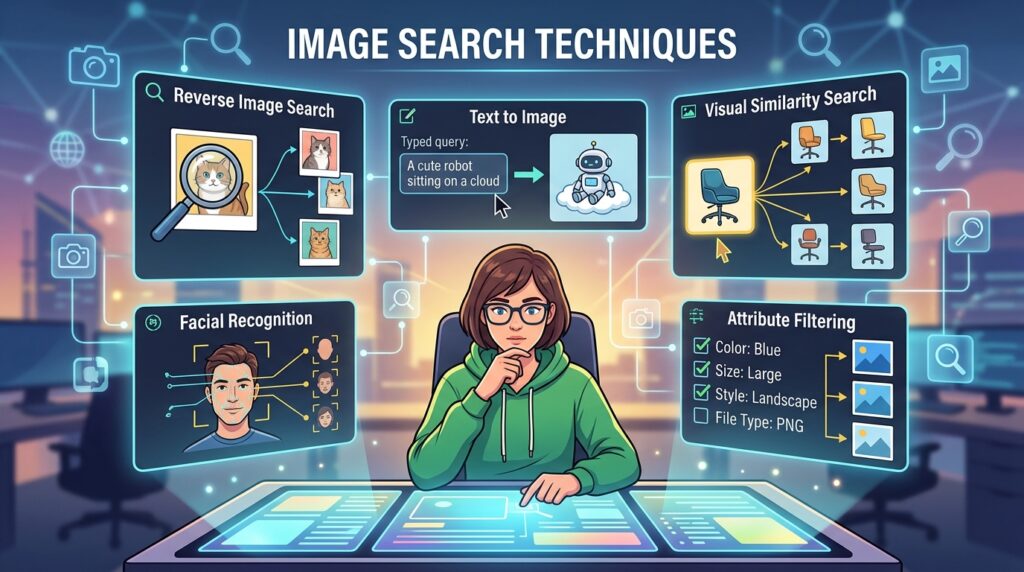
Several search methods are available today. Each serves a different purpose.
Keyword-Based Image Search
This is the most common technique.
Users enter descriptive keywords into a search engine and browse image results. The more specific the keyword, the better the outcome.
Examples:
- Golden Retriever puppy
- Modern office workspace
- New York skyline at night
Specific keywords usually produce more relevant results than broad search terms.
Reverse Image Search
Reverse image search allows users to upload an image instead of entering text.
The search engine analyzes the image and finds:
- Similar images
- Original sources
- Higher-resolution versions
- Related content
This method is particularly useful for fact-checking and image verification.
Visual Search
Visual search uses AI to identify objects, landmarks, products, and people within an image.
Many modern search platforms now offer visual search capabilities that provide highly relevant results.
How to Use Reverse Image Search
Reverse image search is one of the most powerful image search techniques available today.
Upload an Image
Upload an image from your device or paste its URL into a reverse image search tool.
Analyze Results
The tool scans the web and identifies matching or similar images.
Review Sources
Check where the image first appeared and compare different versions.
Benefits of Reverse Image Search
- Verify image authenticity
- Detect fake content
- Find image owners
- Discover image usage online
- Locate higher-quality versions
Researchers, journalists, and marketers frequently rely on this method.
Advanced Image Search Filters
Search engines offer powerful filtering tools that many users overlook.
Search by Size
Filter images based on:
- Large
- Medium
- Small
- Custom dimensions
This feature is useful for web design, presentations, and print materials.
Search by Color
Users can filter images by dominant color.
Examples include:
- Blue
- Red
- Green
- Black and white
- Transparent
Color filtering helps designers find visuals that match brand guidelines.
Search by Usage Rights
This filter helps users find images with specific licensing permissions.
Options often include:
- Creative Commons
- Commercial use
- Reuse allowed
Always verify licensing information before using any image commercially.
Search by Date
Date filters help users locate recent images related to current events and trends.
This is particularly useful for news publishers and researchers.
AI-Powered Image Search Techniques
Artificial intelligence has transformed image searching.
Modern AI systems can recognize:
- Faces
- Objects
- Products
- Animals
- Locations
- Text inside images
Object Recognition
Users can select a specific object within an image and search for related results.
For example, selecting a pair of shoes in a photo may produce shopping recommendations.
Semantic Search
AI understands image context rather than simply matching keywords.
This creates more accurate and relevant search results.
Visual Similarity Matching
AI compares image patterns and identifies visually related content across the web.
These innovations make image search techniques smarter and more efficient in 2026.
Best Tools for Image Search
Several platforms provide excellent image search capabilities.
Google Images
One of the most popular image search tools.
Features include:
- Reverse image search
- Visual search
- Advanced filters
- Usage rights filtering
Bing Visual Search
Offers strong AI-powered image recognition and object detection.
Pinterest Lens
Useful for discovering visually similar products, fashion items, and design inspiration.
TinEye
A specialized reverse image search platform that focuses on image tracking and verification.
Shutterstock Search
Excellent for finding professional stock photography and creative assets.
Using multiple platforms often produces the best results.
Common Mistakes to Avoid
Many users make simple errors that reduce search accuracy.
Using Broad Keywords
Generic terms often generate millions of irrelevant results.
Instead of searching “car,” try:
- Red sports car
- Electric SUV 2026
- Vintage muscle car
Ignoring Filters
Advanced filters significantly improve search quality.
Always use available filters when searching.
Assuming Images Are Free
Not all images can be used legally.
Always review licensing and copyright information before publishing.
Trusting Every Image
Images can be manipulated or taken out of context.
Use reverse image search to verify authenticity.
Tips for Better Image Search Results
Follow these expert recommendations:
Use Specific Keywords
Detailed search terms improve relevance.
Combine Keywords
Adding multiple descriptive words narrows results.
Utilize Reverse Search
Upload images whenever possible.
Apply Advanced Filters
Use size, color, date, and licensing filters.
Search Across Multiple Platforms
Different search engines often provide unique results.
Verify Image Sources
Always confirm the origin of important images.
By following these strategies, you can dramatically improve your search efficiency.
Future Trends in Image Search Techniques
The future of image search techniques looks exciting as artificial intelligence continues to evolve. Search engines are no longer limited to matching keywords or recognizing simple visual patterns. Instead, they are becoming capable of understanding the full context of an image.
For example, future search systems may identify emotions, activities, weather conditions, and relationships between objects within a photo. This deeper understanding will allow users to perform more precise searches and receive highly relevant results.
Voice and Image Search Integration
Voice search and image search are increasingly working together. Users can upload an image and ask questions about it using natural language.
For instance, someone might upload a photo of a plant and ask, “What type of plant is this, and how do I care for it?” AI-powered search tools can then provide detailed answers based on the visual content.
This combination of voice recognition and visual analysis is expected to become a standard feature across major search platforms.
Real-Time Visual Search
Real-time visual search is another growing trend. Smartphone cameras can now identify products, landmarks, animals, and objects instantly.
Imagine pointing your phone at a piece of furniture and immediately seeing:
- Product details
- Price comparisons
- Similar products
- Customer reviews
- Purchasing options
This technology is already being adopted by retailers and e-commerce platforms throughout the USA.
Improved Copyright Detection
As digital content continues to grow, copyright protection becomes increasingly important.
Future image search techniques will offer more advanced image-tracking systems that help creators monitor how their images are being used online. This will make it easier to identify unauthorized use and protect intellectual property rights.
Photographers, graphic designers, and businesses will benefit significantly from these advancements.
How Businesses Can Benefit from Image Search Techniques
Businesses across different industries use image search tools for various purposes. Understanding these applications can provide a competitive advantage.
Brand Monitoring
Companies can track where their logos, product photos, and marketing materials appear online.
By using reverse image search, businesses can identify:
- Unauthorized image use
- Brand mentions
- Counterfeit products
- Affiliate marketing opportunities
Monitoring visual content helps protect brand reputation and maintain consistency.
Competitor Research
Image searches can reveal valuable information about competitors.
Businesses can analyze:
- Product photography styles
- Marketing campaigns
- Visual branding strategies
- Trending design elements
This research can inspire improvements while helping companies stay competitive.
Content Marketing
High-quality visuals improve blog engagement, social media performance, and website conversions.
Marketers who understand advanced image search techniques can quickly locate relevant and legally usable images that enhance content quality.
As a result, users spend more time on websites and interact more frequently with published content.
Image Search Techniques for Students and Researchers
Students and academic researchers can also benefit from advanced image search strategies.
Finding Educational Resources
Many educational institutions publish diagrams, charts, maps, and illustrations that support learning.
Using advanced search filters helps students find:
- Scientific diagrams
- Historical photographs
- Geographic maps
- Research visuals
- Educational infographics
These resources can improve assignments and presentations.
Verifying Information
Images shared online are not always accurate. Some photos are edited, miscaptioned, or taken out of context.
Reverse image search helps researchers determine:
- Original publication dates
- Original sources
- Context of the image
- Whether the image has been altered
This verification process supports accurate academic work and responsible research practices.
Mobile Image Search Techniques
Most internet users now perform searches on mobile devices. Therefore, understanding mobile image search methods is essential.
Using Smartphone Cameras
Modern smartphones include built-in visual search features.
Users can simply:
- Open the camera.
- Point it at an object.
- Activate visual search.
- Review instant results.
This approach eliminates the need to type lengthy search queries.
Searching Screenshots
Many search applications allow users to upload screenshots directly from their phones.
This feature is particularly useful for identifying:
- Clothing items
- Home décor products
- Electronics
- Travel destinations
- Artwork
As mobile technology advances, visual search continues to become faster and more accurate.
Checklist for Effective Image Search Techniques
Before starting your next image search, use this simple checklist:
✔ Use specific keywords
✔ Apply image size filters
✔ Filter by usage rights
✔ Try reverse image search
✔ Compare results across multiple platforms
✔ Verify image authenticity
✔ Check copyright restrictions
✔ Use AI-powered visual search tools
✔ Save reliable sources
✔ Keep search goals clearly defined
Following this checklist can significantly improve search efficiency and result quality.
Conclusion
Mastering image search techniques is an essential skill in today’s digital world. From keyword searches and reverse image lookups to AI-powered visual recognition, modern tools offer countless ways to find accurate and relevant images.
As technology continues to evolve throughout 2026, users who understand advanced image search techniques will save time, improve research quality, and achieve better results. Whether you are a content creator, student, business owner, or researcher, these methods can help you find exactly what you need faster and more accurately.
FAQs
What are image search techniques?
Image search techniques are methods used to find images online through keywords, reverse image search, visual search, and advanced filters.
What is reverse image search?
Reverse image search allows users to upload an image and find similar images, original sources, and related content across the web.
Which image search tool is best in 2026?
Google Images remains one of the most popular choices, while Bing Visual Search and TinEye are also highly effective.
Can AI improve image searches?
Yes. AI-powered tools can recognize objects, faces, locations, and visual patterns to provide more accurate results.
How can I find copyright-free images?
Use usage-rights filters, Creative Commons resources, and reputable stock image websites that clearly state licensing terms.
